Timecrack 1.0.1-alpha.1 Is Available
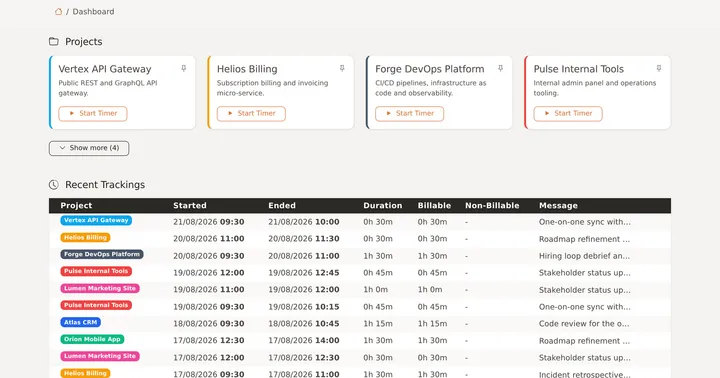
A new alpha release of Timecrack is out: 1.0.1-alpha.1. This one is largely about how the application looks and feels, especially on a phone. The interface has a refreshed palette, tables no longer force you to scroll sideways, you can install Timecrack as an app on your home screen, and a subtle login problem that hit anyone running two installations on one domain is fixed.
As always with an alpha, this build is meant for testing. Try it on a staging instance or a copy of your data first, and let us know what breaks.
A Refreshed Look
The stylesheet is built on a layer of design tokens now — typography, colors, radii and shadows all come from one place instead of being scattered across the CSS. The palette is reduced to cinnamon orange plus dark, so the gray secondary elements that used to fade into the warm background gained real contrast.
Along with that: darker borders, muted text where text should be muted, outlined buttons, and a white background behind every input with a darker border around it. Nothing moved, everything is easier to read.
Tables That Work on a Phone
Tables were the worst part of Timecrack on a small screen. On phones every list now renders as one card per row, with the labels taken from the table head, so a tracking is a readable block instead of a row you have to drag across the screen.
On larger screens the tables changed too:
- Every row stays on a single line, so the times are always readable and never wrap into a second line.
- A table that does not fit scrolls inside its own card instead of stretching the whole page sideways.
- Row action dropdowns escape that scroll container, so they still open fully over the table.
Better on Mobile in General
- Touch targets are at least 44px, so buttons and links are actually hittable with a thumb.
- The active timer sticks to the top while you scroll, so you always see what is running.
- The layout keeps clear of the safe area, which matters once the app is installed and runs without a browser bar.
- Pinch to zoom is allowed again. Blocking it was never a good idea.
Install Timecrack as an App
Timecrack ships as a Progressive Web App now: a web manifest, app icons, a service worker and an offline page. On a phone or a desktop you can install it and get a standalone window with its own icon, no browser chrome around it.
The caching is deliberately conservative. Pages always come from the network, because what they show depends on your session — only static assets and the offline placeholder are cached. The service worker names its cache after the application version, so every release invalidates the old one on its own.
The Latest Blog Posts on the About Page
The About page inside your instance now shows the most recent posts from timecrack.org, pulled from the RSS feed and cached for a day. A failed or unparsable response is not cached, and the page simply renders without the section — so a network hiccup on our side never affects your instance.
Two Installations on One Domain No Longer Log Each Other Out
If you ran two Timecrack installations on the same domain, logging into one logged you out of the other. Both used the same session and “remember me” cookie names. The previous attempt at a fix derived those names from APP_URL, which is http://localhost in a default installation and therefore identical on both instances.
The cookie names now come from APP_KEY, which is unique per installation by definition. Nothing to configure — but note that the change of cookie names logs everyone out once after the update.
While in there, the “remember me” duration was capped as well. It was set to roughly 100 years, far beyond the 400 days browsers keep a persistent cookie, so it never behaved as intended. It is now within that limit and configurable through config/auth.php.
Other Fixes
- Billable hours are calculated correctly for short trackings, and the related UI logic follows the same rule.
- The copied row of the history table is highlighted on striped rows too.
- The test suite runs again — it was failing on a missing database and on tests for routes that no longer exist.
How to Get It
Download the release from the GitHub releases page and follow the update steps. Back up your database and your .env file first, as with any update.
If you would rather not run the upgrade yourself, Managed Hosting keeps your instance current for you, and Technical Support can help if an update does not go to plan.
Found a bug in this alpha? Open an issue on GitHub. Reports from real installations are what turn an alpha into a stable release.
Need Professional Help?
Get custom development, managed hosting, data migration, and technical support — directly from the creators of Timecrack.
Explore Premium